


Caribou Coffee®
4.86.59K Reviews
App Specs
- Version
- 5.12.5
- Updated On
- License
- Free
- Downloads
- 500,000+
- Developer
- Caribou Coffee
- Categories
- Food & Drink
- Platform
- Android, iOS
Screenshots
 Analysis by AppCompare
I use coffee apps for one simple reason: I want the ordering part to disappear when I am already on my way. Caribou Coffee® comes close to that ideal when the connection is steady. It is a free Food & Drink app from Caribou Coffee that puts customization, payment, and pickup into one mobile workflow rather than making me repeat the same order at the counter.
After spending time with it, I see the app as a practical companion for regular Caribou customers, especially people who already know what they like and want to make the visit quicker. It is less compelling for someone who visits only occasionally, prefers browsing a full menu in person, or needs an app that remains dependable when mobile service is poor. The important detail is that this is a connected ordering experience: the app is most useful when it can communicate with the service, process the order, and keep the pickup plan current.
How the connected ordering experience feels in everyday use
I find this experience works best when I treat it as a short chain of decisions, not just a way to skip a queue: settle on the drink, check the details, then make sure the order has reached the café before I head over. The useful question is how each step connects to the next, especially when plans change or the phone’s connection is unsteady. That makes the handoff itself worth a closer look.
Planning an order before leaving home
The smoothest use starts before I leave. I can think through the drink, adjust it, pay, and arrange pickup without standing in line. That sounds ordinary, but the value is in removing small decisions from a busy morning. I am not trying to describe my preferred drink while other customers wait, and I can check the order details on the screen before committing.
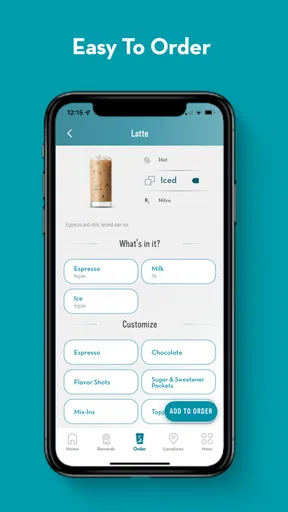
Customization is the heart of the experience. For a straightforward coffee, the process is quick. For a more particular drink, using the app gives me a visual reminder of the choices I made. That reduces the chance of forgetting an adjustment or asking for something in an awkward rush. I still recommend reading the final order carefully, because a mobile interface can make an incorrect tap feel just as official as a spoken mistake.
Connectivity matters from the first screen that needs current information. A reliable connection makes the app feel like a live bridge between my phone and the coffee shop. If the connection is weak, I would not assume that an order has gone through merely because I tapped a button. I wait for a clear confirmation and check the selected pickup details before walking away from the screen.
A realistic morning scenario
Imagine leaving for work with only a short gap before a meeting. I open the app while connected to home Wi-Fi, choose my usual drink, review the customization, and pay before putting on my shoes. On the way, I use mobile service to keep track of the plan. When I arrive, the useful part is not that the app has made coffee magically faster; it is that the ordering conversation has already happened digitally.
Worth Reading Before You Choose

EA SPORTS FC Mobile 26 Is a Bigger Football Game, but It Takes Time

Flipboard Shows What News Apps Must Do Beyond the Feed

Switching to Android Auto Means Rethinking Your Driving Routine

Google Calendar Makes a Crowded Week Easier to Manage

Ludo King Makes the Most of the Minutes Between Plans

Baby Panda World Brings Quick Play to Modern Phones, but Its Game Library Feels Busy
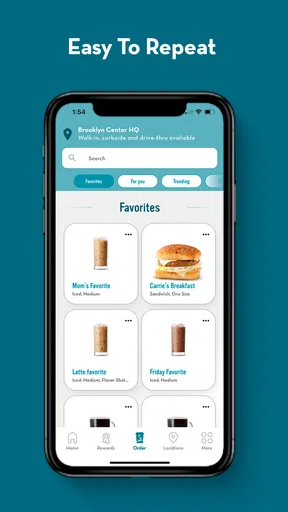
That workflow is particularly helpful when I am ordering the same thing repeatedly. I spend less mental energy rebuilding the order from memory, and I am less likely to hold up the line. It is also useful when I am ordering for another person, because I can pause and verify their preferences instead of trying to remember them while standing at the register.
The trade-off is that this convenience depends on preparation. If I change my mind at the last second, discover that I selected the wrong location, or lose service during the important part of the process, the app can feel less forgiving than simply speaking to a barista. I treat mobile ordering as a plan, not as a substitute for paying attention.
Using it while walking, driving, or carrying a bag
The app fits best into short mobile moments when I can stop safely and give it my attention. I would not operate it while driving. Even a familiar order requires enough concentration to check the drink, location, and payment step. A few seconds of review is a better trade than arriving at the wrong shop with an order I cannot easily change.
On foot, the experience is more comfortable. I can place the order before reaching the café, then avoid pulling out a wallet or repeating the details at the counter. In a crowded public place, however, I prefer to finish the process while stationary. A weak signal, an accidental tap, or a screen that has not refreshed is harder to diagnose when I am moving.
This is where the app differs from a traditional visit. The counter gives me immediate human feedback. The mobile route gives me control and privacy during customization, but I have to interpret the status on my own. Neither approach is always better. The app wins when I value speed and repeatability; the counter wins when I need advice, want to ask a question, or am unsure what to order.
What happens when the connection is unreliable
The main limitation is not complicated: a connected ordering app cannot be treated like a paper note. Current ordering information, payment communication, and confirmation all depend on the phone being able to reach the service. If the network is unstable, I avoid repeated taps because they can create uncertainty about whether the action was accepted.
My recovery habit is simple. I stop, confirm whether the app shows a completed order, and avoid starting over immediately. If I do retry, I first check whether the original attempt created anything. This is a small but important distinction between an app that feels convenient and one that causes duplicate-order anxiety. I would rather spend a moment verifying than pay twice or arrive with two versions of the same request.
When the app appears slow, I also check the basics on my side: whether the phone has a usable connection, whether I have moved into a poor-signal area, and whether the application is responsive enough to display a current state. I do not interpret a frozen screen as proof that the shop has received the order. The safest assumption is that the transaction needs visible confirmation.
This is one area where an in-person order remains more resilient. A barista can tell me immediately whether the location is open and can clarify a question in real time. Caribou Coffee’s app is more efficient when everything is normal, but the human route is easier to understand when something goes wrong.
Payment and the moment of pickup
Payment is valuable because it keeps the pickup process focused. I can deal with the financial step before I reach the counter, leaving fewer tasks for the final handoff. That is especially convenient when I am carrying a laptop, managing a child, or trying to get back outside quickly.
Still, I do not rush past the confirmation screen. I check that the order reflects the drink I intended and that the pickup choice makes sense for my route. Connectivity can affect how quickly the latest status appears, so I prefer to give the app time to finish rather than assuming the first visual response is final.
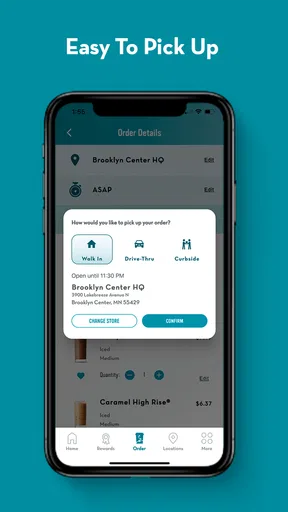
At pickup, I keep the phone available and make sure I am at the location I selected. This sounds obvious, yet it is one of the easiest mistakes to make with any chain-based ordering system. The app can simplify the order, but it cannot correct a location choice I made without looking.
Data-conscious habits that make the app easier to live with
I do not use the app constantly in the background. I open it when I intend to browse, customize, or place an order, then close it when I am finished. That habit keeps the experience intentional and avoids treating a coffee-ordering tool as something that needs my attention all day.
For routine visits, I prepare while connected to trusted Wi-Fi when convenient, but I do not assume that this removes the need for a live connection later. The important actions still need to communicate with the service. I also avoid refreshing repeatedly when a page loads slowly. Repeated refreshes rarely solve a weak signal and can make it harder to tell which screen is current.
People with limited mobile data should be comfortable using the app selectively rather than browsing it aimlessly. The practical approach is to decide what I want, open the relevant screens, review the order once, and finish the transaction. I would not promise that every part of the experience behaves without a connection, so I plan around being online at the moment an order is submitted and confirmed.
Privacy-minded users may also prefer this deliberate approach. I pay attention to what I am doing instead of granting the app more of my time than necessary. The app’s purpose is narrow and clear: ordering Caribou Coffee products for pickup. That focus is a strength, but it also means I would not install it expecting a broad restaurant-discovery tool or a general food marketplace.
Who gets the most value from it
I would recommend it first to regular Caribou visitors who have repeat orders. The more often I return to the same coffee shop, the more useful it becomes to have a consistent mobile route for customization, payment, and pickup. It is also a good fit for commuters, office workers, and parents who appreciate reducing the number of steps at the counter.
It can help occasional customers too, particularly when they already know what they want and are passing a Caribou location during a busy period. The free price removes the need to make a financial commitment just to try the ordering method. The app is intended for Everyone, so its presentation is accessible to a broad audience, although younger users should still use payment and ordering tools with appropriate adult guidance.
The app has a strong reception, with an average rating of 4.8 from around 39 thousand ratings and more than 500 thousand installs. Those figures suggest that the basic idea works well for many people, but they should not replace personal judgment. A high rating does not change the fact that the experience depends on connection quality and on selecting the right details before submitting an order.
Who should choose another approach
I would skip it if I rarely buy Caribou Coffee and do not want another dedicated app on my phone. For a one-time visit, ordering at the counter may be quicker than installing, opening, and learning a separate tool. I would also choose the counter when I need a recommendation, want to discuss an unusual request, or am not sure which drink suits me.
People who frequently travel through areas with unreliable service should be cautious. The app is not the right tool to depend on when I cannot verify a submitted order. In that situation, a direct visit offers clearer feedback. Likewise, if I strongly prefer browsing a physical menu and making decisions through conversation, the app may feel like extra work rather than convenience.
Compared with a general delivery or restaurant app, Caribou Coffee’s focused approach is an advantage for direct pickup at Caribou. I am not sorting through unrelated restaurants or adding a delivery layer when I simply want coffee from a known place. The compromise is narrower scope: it serves this coffee brand rather than acting as a universal food-ordering solution.
Version, compatibility, and the overall feel
The current version is 5.12.5, and it supports devices running Android 8.0 or later. That makes compatibility worth checking before installing, particularly on an older phone. I appreciate that the app is free, because the decision is then mainly about whether its workflow suits my habits rather than whether I will recover an upfront purchase.
Caribou Coffee has been developing the app since its release on April 3, 2015. I read that long presence as a sign that the mobile ordering idea is established rather than experimental, but I still judge it by practical moments: can I customize without confusion, can I recognize a confirmed order, and can I recover sensibly when the network behaves badly?
My answer is yes when I use it with a stable connection and a clear plan. The app does not remove every possible source of friction. It shifts some responsibility to me, especially around checking the location, reading the final order, and verifying that payment and pickup have completed. That is a fair exchange for avoiding a queue, but only if I accept the connected nature of the process.
My connectivity verdict
Caribou Coffee® is a useful mobile ordering app rather than a complete replacement for visiting a café in person. Its best quality is the way it combines customization, payment, and pickup into a repeatable routine. When I have service and know what I want, it saves time and makes the handoff less complicated.
The most important tip is to treat confirmation as part of the order, not as a minor detail. I check the selected location, review the customization, wait for the transaction to finish, and avoid submitting again until I know what happened. Those habits make the app much more reliable in real life, especially when I move between Wi-Fi and mobile service.
For regular Caribou customers, I think it is worth trying. For occasional visitors, the counter may remain simpler. My final recommendation is therefore conditional but positive: use the app when convenience, repeat orders, and a dependable connection line up; choose the traditional route when you need conversation, flexibility, or immediate human reassurance. That balance is where this Food & Drink app makes the most sense.
Pros
- Quickly locate nearby Caribou Coffee® shops using integrated maps.
- Store hours and location details make planning visits more convenient.
- Mobile ordering can reduce waiting during busy periods.
- Rewards progress encourages repeat visits and regular purchases.
- A clean interface makes browsing the menu straightforward.
Cons
- Some features may depend on location and participating stores.
- Menu availability and prices can vary between individual locations.
- Order customization may be more limited than ordering in person.
- The app may require location access for nearby-shop recommendations.
- Rewards and offers can include expiration dates or usage restrictions.
FAQs for Caribou Coffee®
What is the Caribou Coffee® app used for?
The Caribou Coffee® app is designed to make ordering and earning rewards more convenient. After creating an account, you can browse the menu, customize eligible drinks and food, place mobile orders for pickup, locate nearby cafés, and manage your Caribou Perks® rewards. It is especially useful if you regularly visit Caribou Coffee locations and want a faster checkout experience.
Can I earn and redeem rewards through the Caribou Coffee® app?
Yes. The app connects with the Caribou Perks® loyalty program, allowing eligible purchases to contribute toward rewards when you are signed in and use the appropriate payment or loyalty option. Available rewards, earning rules, and redemption conditions may change, so it is worth checking the current details inside the app. Some products, locations, promotions, or transactions may have restrictions.
Can I order Caribou Coffee drinks and food for pickup in the app?
The Caribou Coffee® app supports mobile ordering at participating locations, allowing you to select drinks, food, and available customization options before arriving. You can normally choose a nearby café and review the estimated preparation information before submitting the order. Mobile ordering availability may differ by store, operating hours, demand, menu inventory, and local service conditions.
Does the Caribou Coffee® app support payments and gift cards?
The app can provide convenient ways to pay for eligible purchases, depending on the features available in your region and at participating cafés. Users may be able to add a payment method, use stored value or gift card balances, and apply loyalty benefits during checkout. Before relying on the app, review the payment screen carefully because accepted methods and account requirements can vary.
Is the Caribou Coffee® app free, and what should I know before downloading it?
The Caribou Coffee® app is generally free to download, although you still need a compatible Android or iOS device and an internet connection for many features. An account may be required for mobile ordering, rewards, or saved payment options. Location permissions can improve café searches, while notification access may provide order and promotional updates. Standard mobile data charges may apply.


